Boundary Types
Overview
The Ritter Boundary System supports six boundary types, each controlling how and where events are spawned or unspawned.
Boundary types determine:
- Which tiles are evaluated
- Whether events are spawned or unspawned
- Where saved boundary events can be restored
- How boundary thickness affects the evaluated area
Each type has a different behavior and visual footprint.
This page explains all six types, with screenshots showing their evaluated areas.
Boundary Type Comparison
| Boundary Type | Action | Evaluated Area |
|---|---|---|
SpawnOn | Spawn one event | Random eligible edge tile |
SpawnIn | Spawn one event | Random eligible interior tile |
FillOn | Spawn multiple events | Eligible edge tiles |
FillIn | Spawn multiple events | Eligible interior tiles |
UnspawnOn | Unspawn events | Boundary edge |
UnspawnIn | Unspawn events | Boundary interior |
The distinction between On and In is important:
- On evaluates the boundary’s edge.
- In evaluates the area inside the boundary.
Spawn attempts to create one new event per evaluation, while Fill attempts to populate the eligible tiles in its evaluated area.
Unspawn removes active boundary events from the evaluated area.
Common Boundary Properties
All six boundary types share these properties:
- Type: Determines how the boundary behaves.
- Width / Height: Define the boundary’s base dimensions.
- Thickness: Expands the boundary’s evaluated area outward.
Thickness does not reduce the boundary’s interior. Increasing it extends the evaluated area beyond the original boundary dimensions.
The screenshots below illustrate how these settings affect different boundary types.
SpawnOn - Spawn Along the Edge
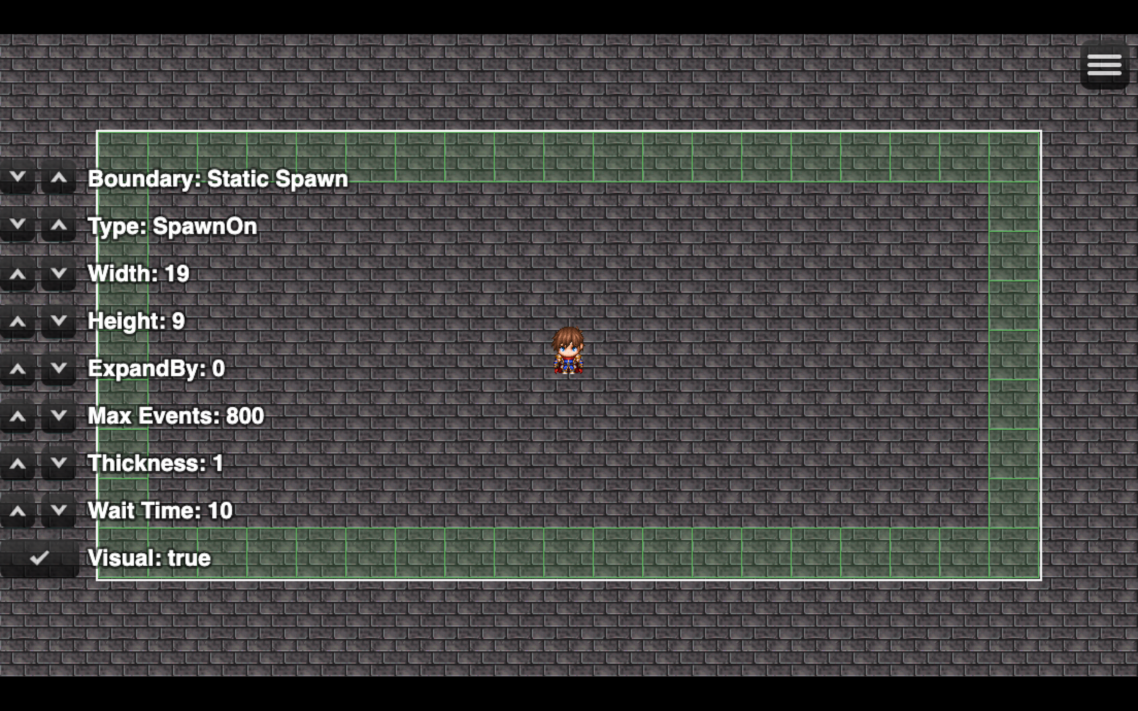
Example Configuration:
- Type:
SpawnOn - Width: 19
- Height: 9
- Thickness: 1
Behavior
SpawnOn attempts to spawn one event at a random eligible tile along the boundary’s edge.
When evaluated, it:
- Restores eligible saved boundary events found along the edge.
- Selects a random valid edge tile for a new event.
- Attempts to spawn one event that meets the configured spawning conditions.
Thickness
Increasing thickness extends the evaluated edge outward, providing additional tiles where spawning can occur.
Use Cases
- Randomized encounters around the player
- Controlled spawning with limited density
- Introducing creatures as the player explores
SpawnIn - Spawn Inside the Boundary
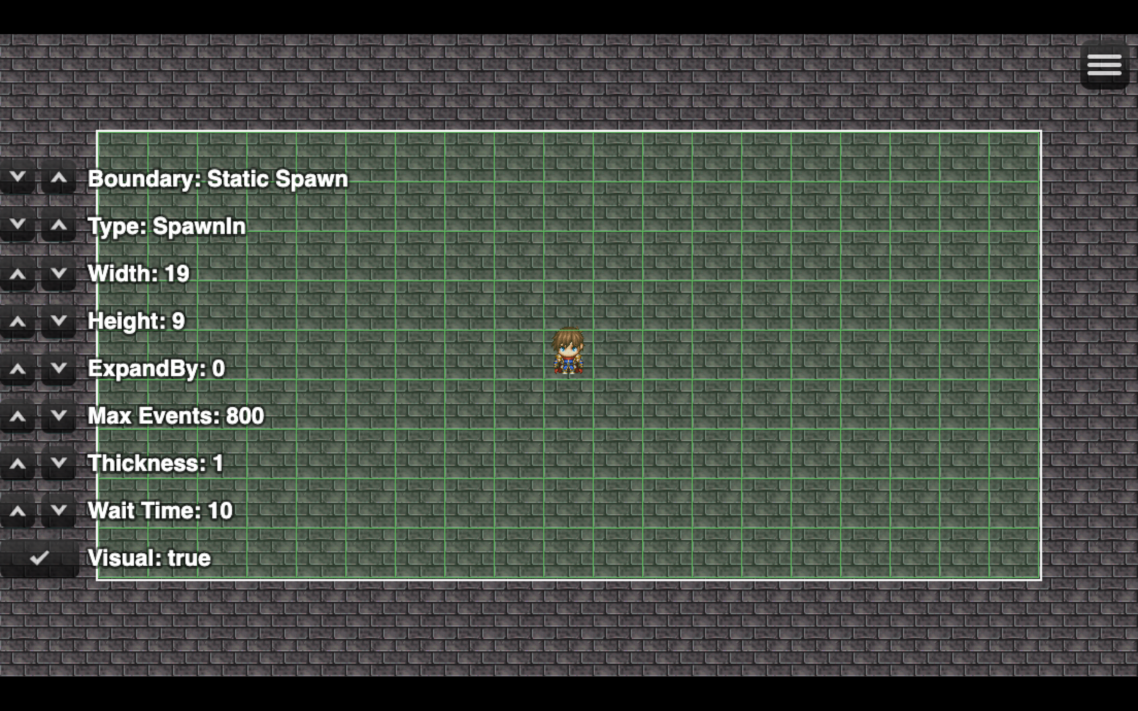
Example Configuration:
- Type:
SpawnIn - Width: 19
- Height: 9
- Thickness: 1
Behavior
SpawnIn attempts to spawn one event at a random eligible tile inside the boundary.
When evaluated, it:
- Restores eligible saved boundary events found within the area.
- Selects a random valid interior tile.
- Attempts to spawn one event that meets the configured spawning conditions.
Unlike SpawnOn, the new event can appear anywhere within the evaluated interior.
Thickness
Increasing thickness expands the evaluated area outward, providing additional interior tiles for spawning.
Use Cases
- Random encounters within an area
- Low-density NPC populations
- Dynamic interior event placement
FillOn - Fill the Boundary Edge
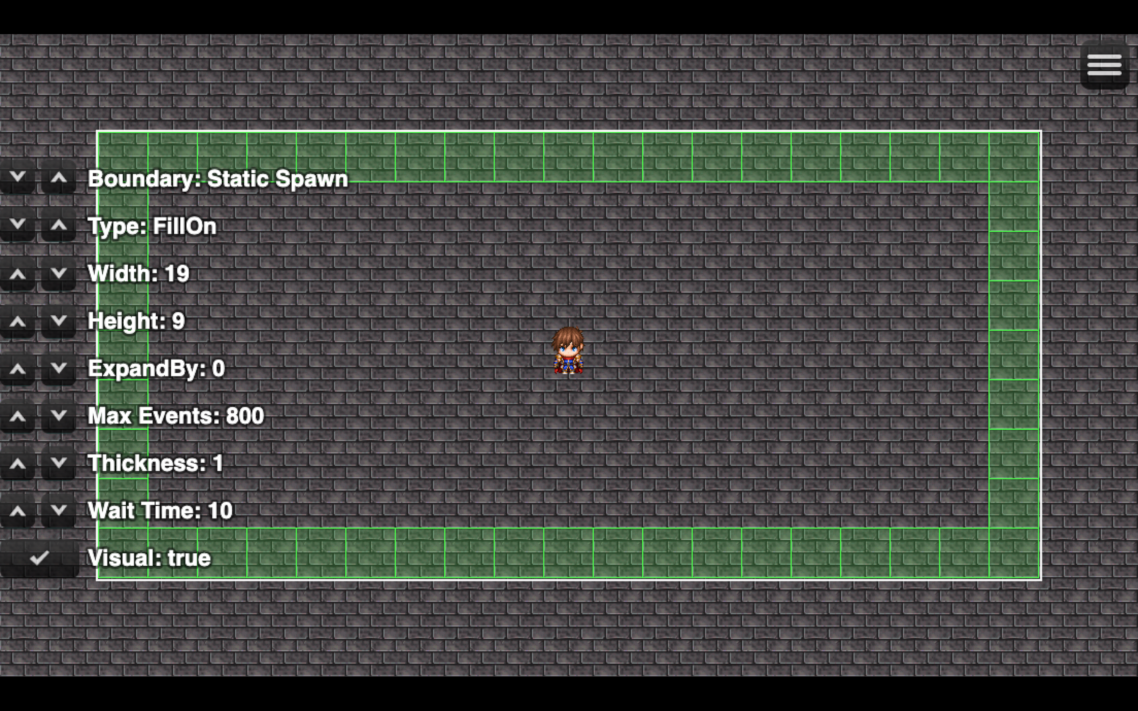
Example Configuration:
- Type:
FillOn - Width: 19
- Height: 9
- Thickness: 1
Behavior
FillOn attempts to spawn events across every eligible tile along the boundary’s edge.
When evaluated, it:
- Checks the boundary’s edge tiles.
- Restores eligible saved boundary events found on those tiles.
- Attempts to spawn new events according to the configured Boundary Event rules.
Unlike SpawnOn, which attempts one new event, FillOn can populate multiple eligible tiles during an evaluation.
Thickness
Increasing thickness adds additional outward rings of edge tiles to the evaluated area.
Use Cases
- Perimeter-based spawning
- Border guards and environmental objects
- Populating the edges of an area
FillIn - Fill the Boundary Interior
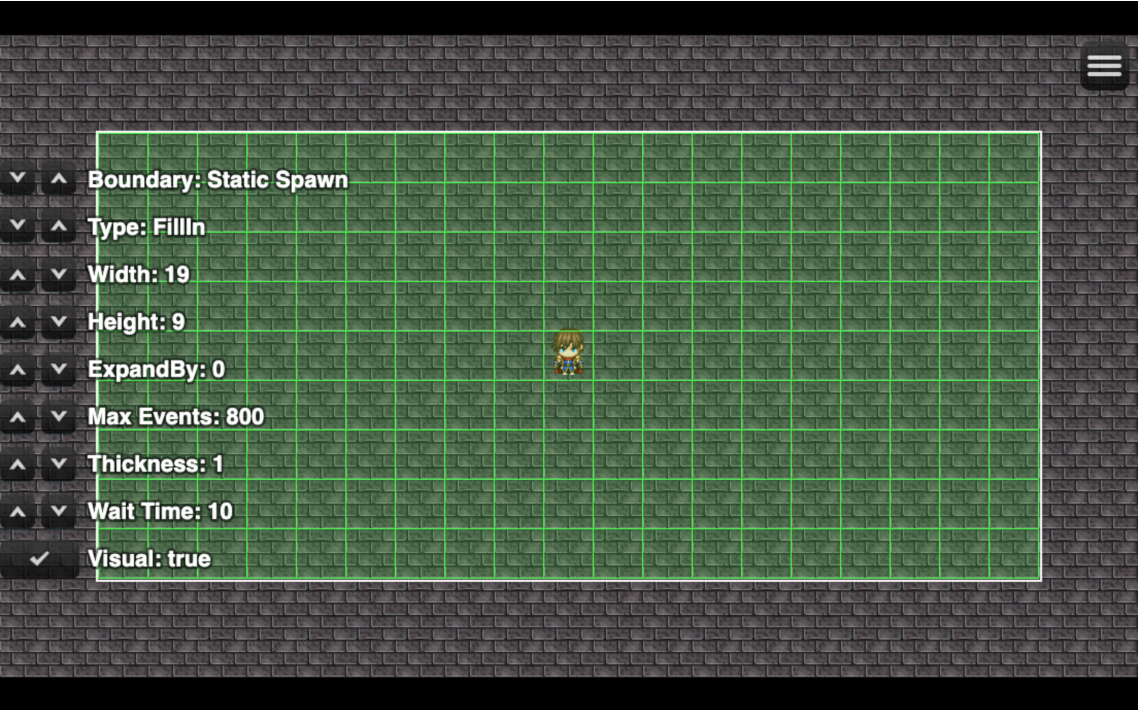
Example Configuration:
- Type:
FillIn - Width: 19
- Height: 9
- Thickness: 1
Behavior
FillIn attempts to spawn events across every eligible tile inside the boundary.
When evaluated, it:
- Checks tiles throughout the boundary’s interior.
- Restores eligible saved boundary events within the area.
- Attempts to spawn new events according to the configured Boundary Event rules.
Unlike SpawnIn, which attempts one new event, FillIn can populate multiple eligible tiles during an evaluation.
Thickness
Increasing thickness expands the evaluated interior outward, increasing the area available for spawning.
Use Cases
- Populating areas with NPCs or interactable objects
- Filling zones with environmental details
- Preparing populated areas for gameplay
UnspawnOn - Unspawn Along the Edge
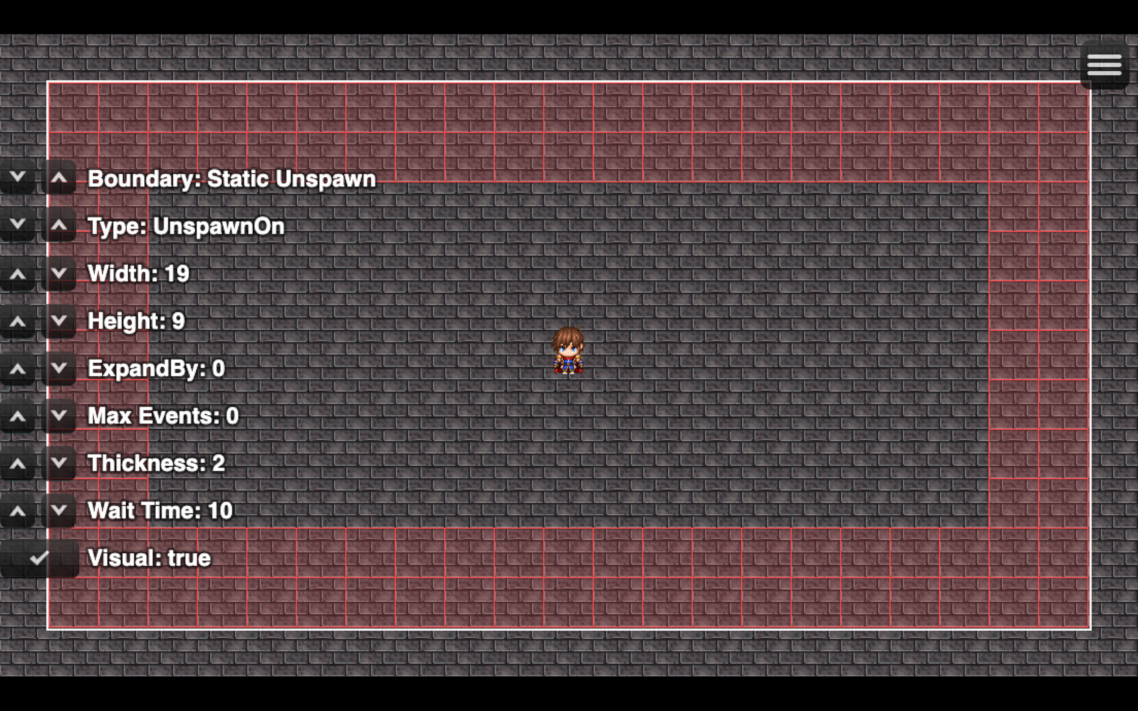
Example Configuration:
- Type:
UnspawnOn - Width: 19
- Height: 9
- Thickness: 2
Behavior
UnspawnOn evaluates the boundary’s edge and unspawns applicable boundary events found there.
When evaluated, it:
- Checks the boundary’s edge tiles.
- Unspawns applicable events located on those tiles.
- Preserves saved boundary event data for future restoration.
This type is especially useful when paired with a smaller spawn boundary.
As events move away from the player and reach the outer unspawn boundary, they can be removed from the active map.
Thickness
Increasing thickness extends the evaluated edge outward, allowing the boundary to cover additional tiles.
Use Cases
- Cleaning up events as the player explores
- Removing distant creatures and NPCs
- Maintaining an active event population around the player
UnspawnIn - Unspawn Inside the Boundary
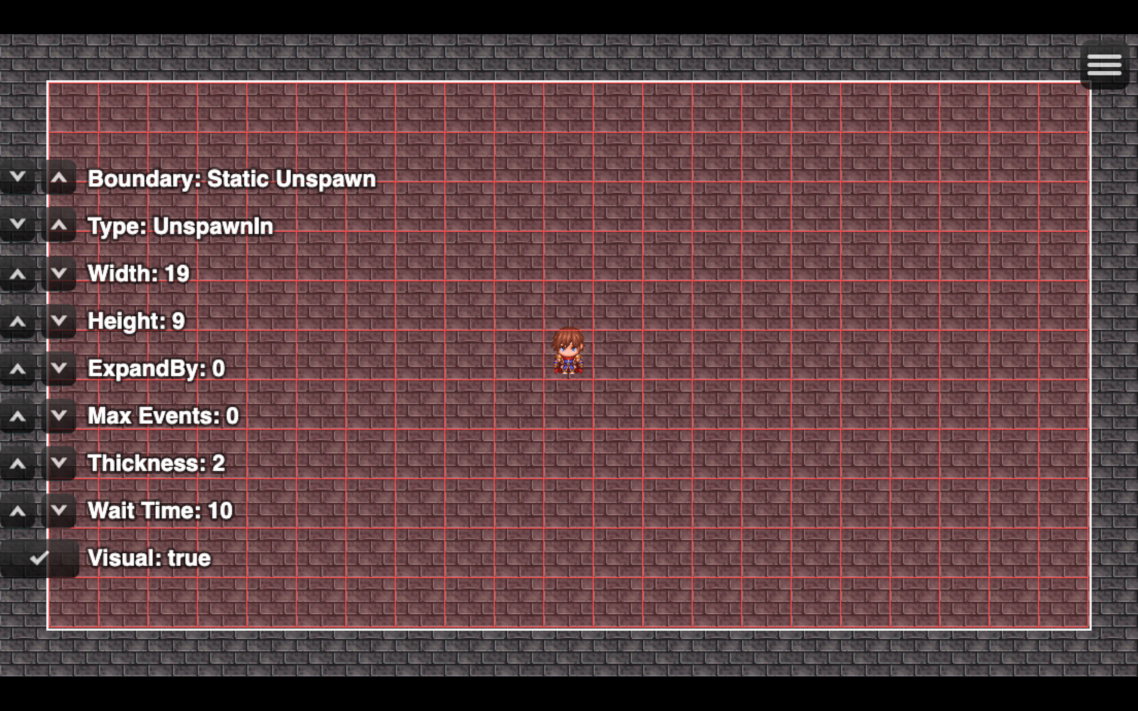
Example Configuration:
- Type:
UnspawnIn - Width: 19
- Height: 9
- Thickness: 2
Behavior
UnspawnIn evaluates the entire boundary interior and unspawns applicable boundary events found within it.
When evaluated, it:
- Checks tiles throughout the boundary’s interior.
- Unspawns applicable events located within the area.
- Preserves saved boundary event data for future restoration.
Unlike UnspawnOn, which evaluates the edge, UnspawnIn operates throughout the evaluated area.
Thickness
Increasing thickness expands the evaluated area outward.
Use Cases
- Clearing populated areas
- Removing events throughout a zone
- Managing event populations across large areas
Choosing the Right Boundary Type
The best boundary type depends on how you want events to appear or disappear.
For example:
- Use
SpawnOnto introduce creatures along the edge of the player’s surroundings. - Use
SpawnInto place occasional events randomly within an area. - Use
FillOnto populate the perimeter of a region. - Use
FillInto populate an entire area. - Use
UnspawnOnto remove events as they reach the edge of a larger cleanup boundary. - Use
UnspawnInto clear events throughout a selected area.
You can combine multiple boundaries to create more advanced spawning and event streaming behavior.
For a practical introduction to using boundaries together, see the Boundary System Introduction.
For implementation details, see Boundary Plugin Commands and Boundary Script Calls.