Boundary Event Setup
Overview
Boundary Event Setup tells the Boundary System which template events can be generated automatically by your spawn boundaries.
Each template event can be configured with:
- Spawn Boundaries: Which boundaries are allowed to generate the event.
- Gameplay Maps: Which maps the event can appear on.
- Regions: Which region IDs allow the event to spawn.
- Enabled: Whether the template is initially available for automatic spawning.
- Save: Whether spawned copies should be saved as persistent boundary events.
This setup works in both RPG Maker MV and MZ, with slightly different instructions for each engine.
Boundary Event Setup does not spawn an event by itself. It makes the template available for automatic spawning when a configured boundary processes it.
RPG Maker MZ Setup
In RPG Maker MZ, configure your template using the BoundaryEventSetup plugin command.
- Open the spawn map containing your template event.
- Open the template event and select its first event page.
- Add a Plugin Command and select
Ritter_EventSpawner. - Choose BoundaryEventSetup.
- Configure the boundary names, gameplay maps, regions, and other settings.
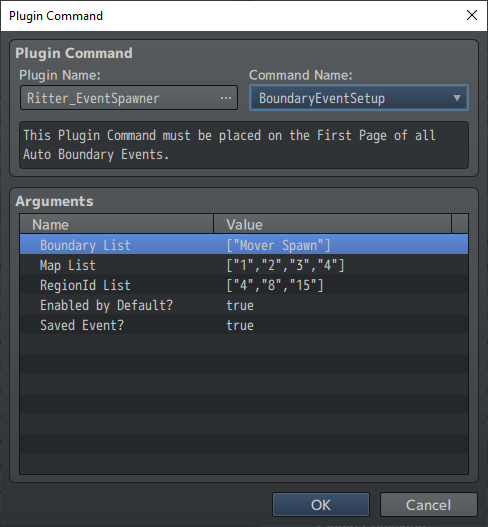
Command Arguments
| Argument | Description |
|---|---|
BoundaryList | Names of the spawn boundaries allowed to generate this event. |
MapList | Gameplay map IDs where this event may be generated. |
RegionsList | Region IDs where the event is allowed to spawn. |
Enabled | Whether the template is initially available for automatic spawning. |
Save | Whether generated events should be saved as persistent boundary events. |
You can specify multiple boundary names, gameplay maps, and region IDs to make a single template available in different areas of your game.
RPG Maker MV Setup
RPG Maker MV uses a traditional Plugin Command instead of MZ’s structured command interface.
On the first page of your template event, add a Plugin Command containing:
Ritter_EventSpawner BoundaryEventSetup {"BoundaryList":["NPCs"],"MapList":[1],"RegionsList":[1,3],"Enabled":true,"Save":true}
This configures the same five settings available in RPG Maker MZ.
The command also accepts the JSON-encoded array strings and string-based boolean values used by MZ.
For other Boundary System operations in RPG Maker MV, use the available Boundary Script Calls.
Example: Setting Up NPC Spawning
Imagine you have an NPC template on spawn map 2 that you want to generate automatically on gameplay map 1.
You’ve already created a spawn boundary named NPCs, and you want NPCs to appear only on tiles marked with region 1 or 3.
Configure the template with these settings:
| Setting | Value |
|---|---|
| BoundaryList | ["NPCs"] |
| MapList | [1] |
| RegionsList | [1,3] |
| Enabled | true |
| Save | true |
With this configuration:
- The
NPCsboundary can generate this template. - New NPCs can appear on gameplay map
1. - Spawning is restricted to the specified region IDs.
- The template is enabled for automatic spawning.
- Generated NPCs are saved as persistent boundary events.
You can create additional templates with different settings to populate your world with different NPCs, enemies, creatures, or resources.
How Boundary Event Setup Works
Boundary Event Setup defines which templates are eligible for automatic spawning.
When a spawn boundary evaluates its configured area, the Boundary System can select templates whose settings match the current boundary, gameplay map, and eligible regions.
Each template can belong to one or more spawn boundaries, allowing you to control which event populations appear in different areas.
Using Multiple Templates with One Boundary
A single spawn boundary can generate many different event templates.
For example, you could configure:
- Wildlife: Spawns in forest regions.
- NPCs: Spawn in village regions.
- Resources: Spawn in designated gathering regions.
All three templates can use the same spawn boundary, with their individual RegionsList settings determining where each type can appear.
You can then use a single unspawn boundary to manage all three event populations.
Separate spawn boundaries are only needed when you want independent control over their spawning behavior, coverage, or other boundary settings.
Enabling and Disabling Templates
The Enabled setting determines whether a template starts available for automatic spawning.
You can also enable or disable templates during gameplay using the Boundary System’s Enable Event and Disable Event plugin commands.
Disabling a template prevents it from being selected for new automatic spawns. It does not remove events that have already been spawned or delete existing saved boundary events.
Important Notes
- Place Boundary Event Setup on the first page of each template event intended for automatic boundary spawning.
BoundaryListuses the names of your spawn boundaries.MapListrefers to gameplay maps, not the spawn map containing the template.RegionsListcontrols which region IDs are eligible for spawning.- Setting
Savetotrueallows generated events to retain persistent boundary event data. - Boundary Event Setup is intended for automatic event generation. It is not required when creating saved events directly through the explicit preload commands.
- For more control over event placement see Preloaded Boundary Events page.
Related Documentation
- Boundary System Introduction — Learn how boundaries work together.
- Boundary Types — Understand the six spawning and unspawning behaviors.
- Boundary Plugin Commands — Configure boundaries and automatic handlers in RPG Maker MZ.
- Boundary Script Calls — Create and manage boundaries through JavaScript.
- Preloaded Boundary Events — Create persistent events without automatic template generation.
- Saved Boundary Events — Learn how persistent boundary events are stored and restored.