Spawn Maps & Templates
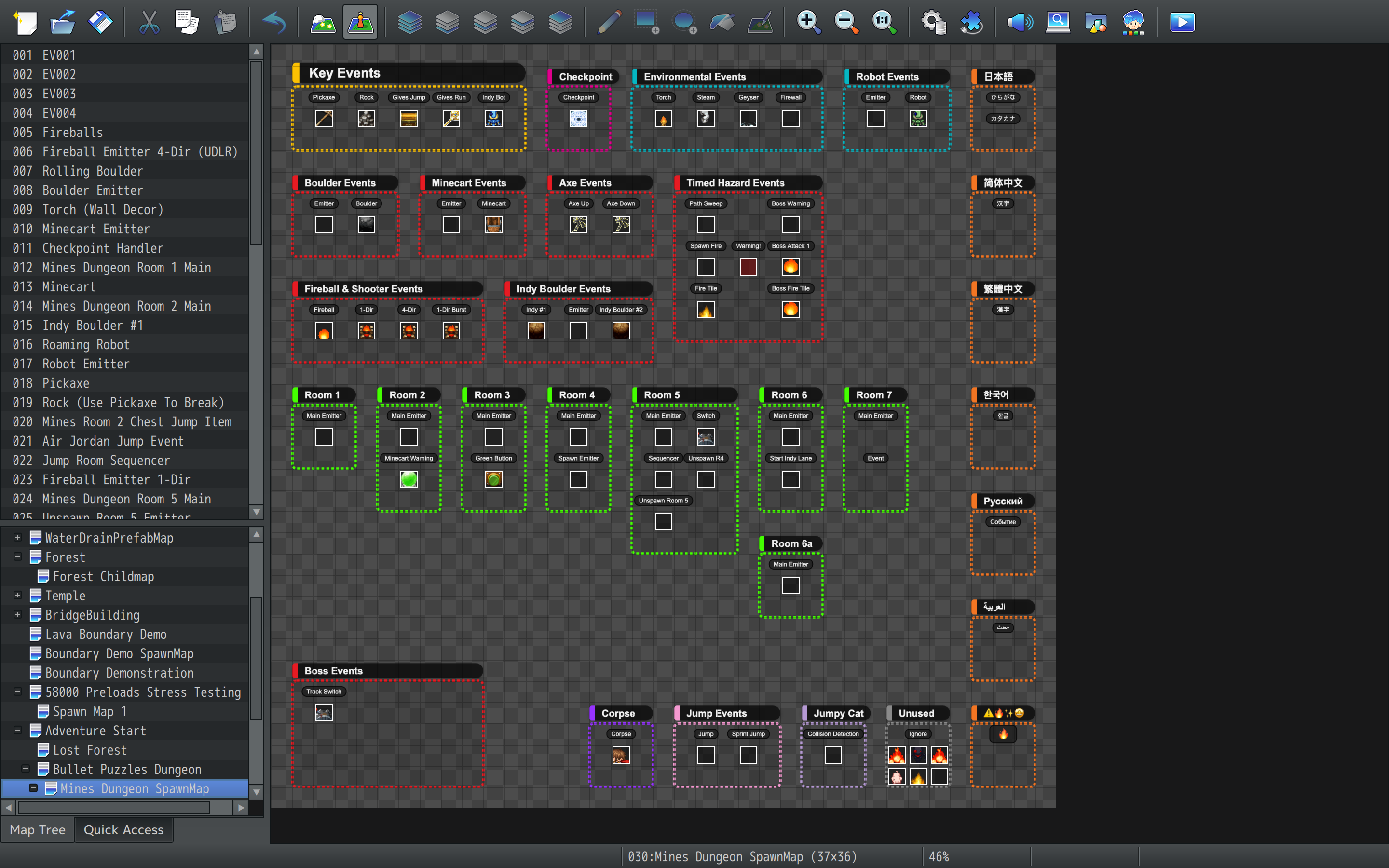 (Spawn Map Event Groups Created With Spawn Map Designer)
Overview
Spawn Maps and Template Events are a foundational concept of the Ritter Ultimate Event Spawner.
Instead of placing large numbers of real events directly onto gameplay maps, the Event Spawner allows developers to:
- Define events once on dedicated spawn maps
- Treat those events as reusable templates
- Dynamically spawn copies of those templates onto gameplay maps
This approach dramatically simplifies event management, improves maintainability, and enables powerful persistence systems when combined with boundaries.
What Is a Spawn Map?
A spawn map is a normal RPG Maker map that is designated for holding template events.
Key characteristics of spawn maps:
- They are not intended for player access
- They exist purely as data sources
- Events placed on them act as templates, not live gameplay events
You may create as many spawn maps as you like, allowing you to organize templates by:
- System type (NPCs, enemies, objects)
- Area or biome
- Gameplay purpose
Template Events
Each event placed on a spawn map can be used as a template event.
Template events:
- Are created using RPG Maker’s normal event editor
- Contain the event pages, commands, and settings you want your spawned events to use
- Can be reused to spawn as many copies as needed
When an event is spawned, the Event Spawner:
- Uses the template event’s pages, commands, and settings
- Creates a new event on the gameplay map
- Assigns the new event its own
eventId
You can edit your template events just like any other RPG Maker event. This makes it easy to update and manage events without placing individual copies throughout your gameplay maps.
Why Templates Matter
Using template events provides major workflow advantages.
Centralized Editing
Instead of editing many identical events across multiple maps:
- Update the template event once
- All newly spawned copies will reflect the changes
This is especially useful for:
- NPC dialogue updates
- Behavior or logic fixes
- Balancing changes
- Trigger events or interactables
Reduced Map Clutter
Gameplay maps can remain:
- Clean
- Lightweight
- Easy to navigate in the editor
All complexity lives in spawn maps, not gameplay maps.
Flexible Spawning
Template events can be spawned as either temporary or saved events.
- Temporary Events: Exist on the current map until they are removed or the player leaves the map. Great for enemies, effects, and other events that don’t need to be remembered when the player returns.
- Saved Events: Remain saved when the player leaves the map, allowing them to be restored when the player returns. Great for NPCs, treasure chests, and other events that need to remember their state.
You can use both types in the same project, giving you control over which events should be remembered and which can be recreated as needed.
For more information, see Saved Events.
Example Workflow
Here’s how to create and use your first spawn map:
- Create a new map in RPG Maker to hold your template events. Give it a recognizable name, such as
SpawnMap. - Create an event on that map using RPG Maker’s normal event editor. Set up its graphics, pages, commands, and behavior just like any other event.
- Find the map and event IDs you want to use. You’ll need these to tell the Event Spawner which event to spawn.
- Open a gameplay map where you want the event to appear.
- Create an event with a Script command and enter the following:
const spawnMapId = 2;
const spawnEventId = 1;
const x = 8;
const y = 10;

Ritter.spawnEvent(spawnMapId, spawnEventId, x, y);
Change the values to match your project. The Event Spawner will create a copy of your template event at the specified coordinates on the current gameplay map.
You can spawn the same template as many times as you need, at different locations or on different gameplay maps.
For more spawning options, see Script Calls.
Updating Template Events
Need to change how a spawned event looks or behaves? Simply open its template event on the spawn map and make your changes in RPG Maker’s event editor.
For example, you could:
- Update an NPC’s dialogue.
- Change an enemy’s graphics or behavior.
- Modify the contents of a treasure chest.
- Fix or improve event commands.
Newly spawned events will use the updated template when you run your game with those changes.
Important: Saved events also use their original templates when being restored, so changing a template can affect events in existing save files. Avoid deleting or changing the IDs of templates used by saved events, as this can prevent them from being restored correctly.
Best Practices
- Stay organized: Give your spawn maps and template events descriptive names so they’re easy to find.
- Reuse templates: Instead of creating dozens of identical events, create one template and spawn copies wherever you need them.
- Choose when to save: Use temporary events for things that don’t need to be remembered, and saved events for things that should persist between visits.
- Manage active events: Unspawn events when they’re no longer needed to take advantage of the Event Spawner’s recycling system.
- Keep your templates: Don’t delete templates that are still being used by saved events.
For more information about event recycling, see Event Recycling.
When dealing with a lot of event templates use Spawn Map Designer to keep your Spawn Maps organized!
Summary
- Spawn maps hold reusable template events
- Templates are copied when events are spawned
- Multiple spawn maps are fully supported
- Editing templates simplifies large-scale changes
Spawn Maps & Templates form the backbone of scalable, maintainable event-driven projects.